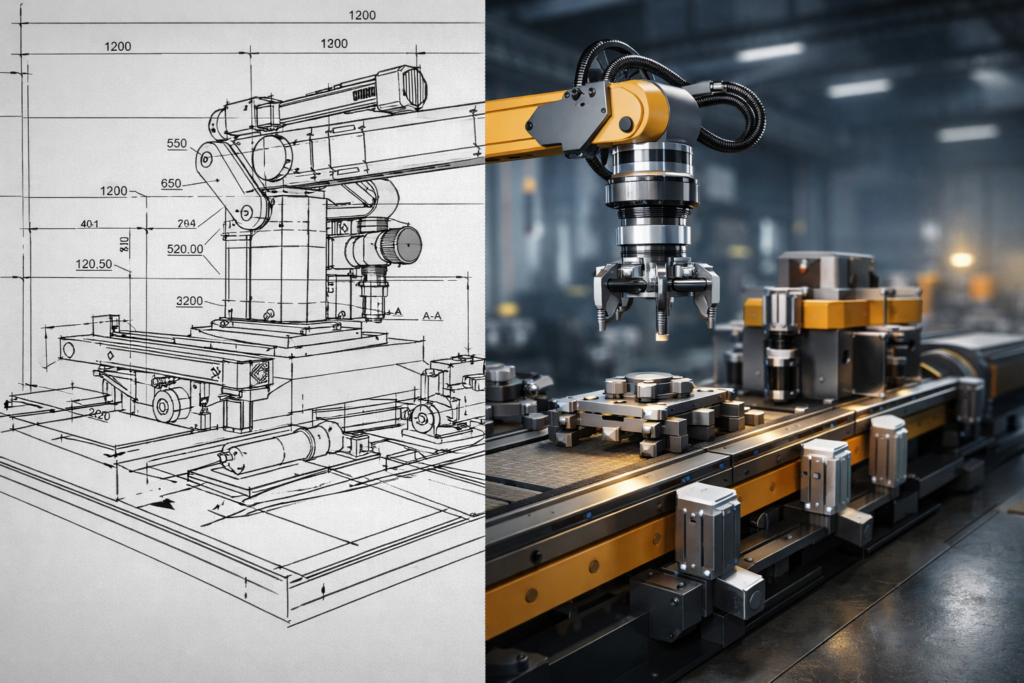
Static CAD Drawings have been the backbone of engineering for decades. If you work in engineering, manufacturing, or industrial design in the UK, chances are you rely on them daily. They are familiar, precise, and technically sound.
But here is the truth, many teams quietly agree on.
Static CAD drawings are struggling in a world where speed, clarity, and shared understanding matter more than ever.
It is not that CAD drafting is wrong; it’s just that 3D models offer greater clarity and a better view. It is that the way people consume information has changed, making modern CAD tools more relevant than ever, especially for designers who can get a 2D view. Engineers, stakeholders, clients, and even internal teams now expect visuals that do more than sit still.
And that is where the gap becomes apparent, particularly when transitioning from 2D drawings to 3D CAD models in product development.
Static CAD Drawings Do Their Job, But Only to a Point
Let’s give credit where it is due. Static CAD drawings are highly accurate.
They are trusted for:
-
Dimensions and tolerances in 2D engineering drawings are critical and can significantly impact manufacturing, especially when adhering to CAD standards and drafting rules.
-
Manufacturing references often rely on accurate CAD models to ensure precision and efficiency.
-
Engineering documentation for 3D design and computer-aided design.
-
Regulatory and compliance needs
For engineers, 2D CAD drawings make perfect sense, but 3D models can enhance understanding.
The challenge arises when the same drawings must communicate beyond the engineering desk, using 2D drawings created for clarity to ensure effective communication.
When Static CAD Drawings Stop Being Clear
What happens outside the engineering team?
Not everyone reads CAD drawings fluently, which is why 2D and 3D models, along with accurate CAD representations, can be more effective for communication. Project managers, sales teams, investors, operators, and clients often see a wall of lines in 2D drawings instead of a clear story.
This is where static CAD drawings fall short compared with dynamic 3D models, which better showcase product development.
They struggle to show the benefits of 3D models over traditional 2D CAD, which can be a byproduct of the 3D modeling process.
-
How parts actually move within the design process can be illustrated effectively.
-
How 2D CAD assemblies come together in a 3D model, and design plays a crucial role in the overall project outcome.
-
How a system behaves over time is crucial in product design and can be better visualized using modern CAD techniques.
-
How a product works in the real world can be better illustrated through dynamic engineering drawings.
As Forbes highlights, people retain far more information when it is presented visually and dynamically, especially with the aid of CAD files. Visual content consistently outperforms static documentation when it comes to understanding and recall.
That gap in understanding costs time, money, and patience.
Static CAD Drawings vs Modern Visual Communication
Here is a simple comparison that many UK engineering teams relate to instantly when discussing CAD file formats such as DXF and their impact on collaboration, particularly for 2D files.
| Static CAD Drawings | 3D Animation and Motion enhance the understanding of how a 3D model is populated with information, which is crucial to design. |
|---|---|
| Accurate but static | Accurate and dynamic representations are crucial in 3D design, especially when every design detail matters. |
| Best for engineers who utilize 2D or 3D models to enhance their designs. | Works for all stakeholders in a 3D model environment. |
| Requires technical literacy, especially when working with engineering drawings in 2D and 3D CAD models. | Easy to understand visually |
| Limited storytelling can lead to miscommunication and delays. | Clear process and flow are essential for understanding how a 3D model is populated using information. |
| Explains what exists | Shows how it works through detailed blueprints and animations. |
This is why many teams are now pairing CAD with animation instead of relying on drawings alone.
The Growing Pressure on UK Engineering Teams
Engineering teams in the UK are under greater pressure than ever to deliver eco-friendly designs while ensuring their 2D drawings convey the necessary information.
Projects move faster when utilizing CAD software to streamline workflows. Teams are more cross-functional, using BIM and CAD software to improve collaboration, particularly when they are comfortable with 2D drawings or can generate a 2D view. Communication happens across departments, countries, and time zones.
According to McKinsey, companies that communicate complex processes visually can improve decision making speed by up to 30 percent. That matters when timelines are tight, and miscommunication is costly in 2D blueprints.
Static CAD drawings were never designed for that level of communication; therefore, modern CAD file formats are essential.
Why Movement Changes Everything?
Seeing motion builds instant understanding
The moment something moves in a 3D model, understanding improves, showcasing the advantages of the 3D modeling process.
When a viewer sees components assemble, rotate, or interact, the brain fills in the gaps automatically, creating a 2D view of the 3D. There is less guessing and fewer explanations needed when using a 3D model for visualization.
Still wondering where industrial 3D animation really makes a difference? Explore the Top 10 Uses of Industrial 3D Animation and see it in action.
Movement turns technical knowledge into shared knowledge.
Static CAD Drawings in Sales and Presentations Fall Flat
CAD drawings are perfect internally. Externally, they often struggle.
In sales meetings or client presentations, Static CAD Drawings can feel cold and difficult to follow, making the transition to 3D modeling easier. They require explanation layered on top of explanation, often facilitated by cloud-based tools that help minimize material waste.
By contrast, animated visuals:
-
Show value instantly
-
Reduce back-and-forth questions
-
Build confidence in the product
-
Help non-technical audiences stay engaged with effective visualization techniques using CAD files and 3D models.
This is especially true when static 2D drawings fail to convey the full picture, often necessitating rework in the design process due to inefficient communication. 3D animation enhances industrial equipment demonstrations, allowing viewers to see performance, scale, and function in seconds, enhancing the 3D modeling process.
Industrial Automation and Robotics Need More Than Lines
As systems become more automated, visual complexity increases, especially when information is presented in 2D views.
Static CAD drawings cannot easily communicate:
-
Robotic sequences are often best visualized with accurate CAD models, which support the conceptual design phase.
-
Sensor interactions can be modeled effectively in 3D to demonstrate their impact on product development and underscore the importance of parametric design.
-
Automated workflows
-
Safety zones and movement paths in 3D design.
This is why the drafting rules must be adhered to in order to maximize the effectiveness of CAD tools. The role of 3d animation in industrial automation & robotics has become so important. Motion allows teams to test, explain, and present systems before they exist physically, which is particularly useful in product design.
Tips for Moving Beyond Static CAD Drawings
Simple ways UK engineering teams can adapt
You do not need to abandon CAD; modern CAD can significantly enhance your workflow. You just need to build around it.
Here are practical tips for using computer-aided design tools effectively in your projects: consider incorporating 3D models.
-
Use CAD as the foundation, not the final output, to ensure that 2D drawings are created effectively.
-
Add real-time animation for presentations and training to enhance engagement, especially in the context of 3D modeling processes.
-
Show movement, not just structure
-
Focus on clarity over technical density
-
Think about who needs to understand the visual and how 3D CAD can enhance their comprehension, especially in the context of building information modeling and using information placed in 2D.
Even small motion elements in a 3D model can dramatically improve comprehension, making the use of CAD tools invaluable in mechanical engineering.
Why This Shift Is Not Just Technical
Here is something rarely said out loud about eco-friendly practices in engineering.
Static CAD drawings can be intimidating.
When people feel confused, they disengage. When they disengage, mistakes occur, reducing their efficiency on 3D projects. When errors occur, frustration builds, particularly on projects involving complex 2D engineering drawings.
Clear visuals reduce friction, particularly when using 3D CAD models for presentations and when rework is necessary. They build trust between teams, particularly in AEC projects where collaboration is essential, especially among engineers and architects. They help everyone feel confident moving forward.
That emotional impact is just as valuable as technical precision.
The Real Question UK Teams Are Asking Now
It is no longer, “Are Static CAD Drawings useful?”
The real question is, “Are they enough on their own?”
For most UK engineering teams today, the answer is no.
CAD is still essential. But it works best when paired with visuals that explain, demonstrate, and connect seamlessly with 2D or 3D representations, enhancing product quality.
The Way Forward for UK Engineering
Static CAD Drawings are not outdated; however, they can benefit from improved visualization techniques, especially when combined with 3D CAD models. They are simply incomplete on their own.
Modern engineering demands visuals that move, explain, and connect with people who do not live inside technical drawings every day.
When teams combine CAD precision with visual storytelling, communication becomes easier, decisions happen faster, and projects move forward with confidence.
And that is when engineering work truly starts to shine, particularly in the world of CAD.
Explore the Demo Reel and see how motion turns engineering detail into understanding.
FAQs
Why do engineers use CAD instead of traditional hand drawings?
Engineers use CAD because it offers precision, consistency, easy revisions, and accurate documentation that hand drawings cannot match.
What are the disadvantages of CAD over manual drawing?
CAD software can feel less intuitive to non-technical audiences. It often cannot clearly represent movement and real-world behavior without effective CAD tools, necessitating conversion services.
What is the advantage of CAD over traditional paper drawings?
CAD enables precise measurements, faster revisions, digital storage, and seamless integration with manufacturing processes, particularly in the manufacturing sector.
Why do architects still use AutoCAD?
Architects continue using AutoCAD because it provides reliable drafting tools, industry standards, and compatibility with construction and engineering workflows, including support for DWG file formats.